
Digital Signatures
Published on Jan 26, 2024 15:49 by satoshiken
Table of Contents
1. Intro
In the previous article, we introduced asymmetric encryption, and particularly the use of public key encryption for transmitting secrets. In this article, we shall take a look at digital signatures, another application of asymmetric encryption.
In public key encryption, we used the recipient's public key to encrypt the message in transit so that only the recipient could decrypt it using their private key.
By contrast, in a digital signature system, the sender signs a hash of the message with their private key producing a signature. The signature is attached to the message and sent to the recipient. The recipient can then use the sender's public key to verify the signature.
The goal is not to hide the message from eavesdroppers, but to prove to the recipient that the message is approved by the sender and was not tampered with in transit.
2. Signing
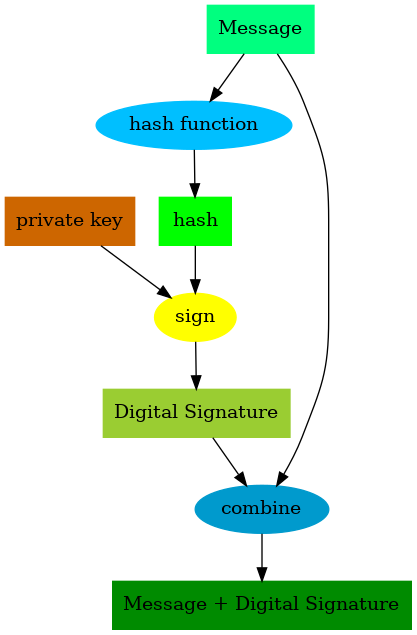
Figure 1: Illustration of signing
The sender will first generate a hash of the message to get a fixed-size representation of it (we discussed hashing in this article).
The hash will then be signed using the sender's private key producing a signature. This signature will be attached to the original message and sent to the recipient.
3. Signature Verification
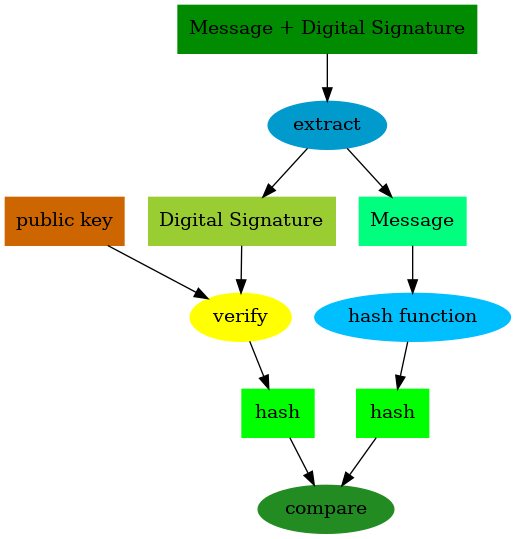
Figure 2: Illustration of verification
On receiving the signed message, the recipient will verify the signature with the sender's public key which recovers the original hash of the message.
Additionally, the recipient also independently generates another hash of the received message on their side. If the two hashes match, this confirms to the recipient that the message they received is the same as the one approved by the sender.
This also confirms that the message wasn't tampered with in transit, because only the sender's private key could have been used to create a signature that can be verified with their public key.
4. Uses
Some uses of digital signatures:
- Software developers can sign the software packages and binaries they produce, which users (manually or automatically through package managers) can verify against the developers' published public keys to check for tampering.
- In blockchain systems, transactions sent by an account are sent along with a signature which can be used to verify all valid transactions from the account.
5. Examples in code
We take a look at signing and verifying in Python and JavaScript.
5.1. Python
import base64

from cryptography.hazmat.primitives.asymmetric import rsa, padding, utils
from cryptography.hazmat.primitives import hashes

private_key = rsa.generate_private_key(public_exponent=65537, key_size=2048)
public_key = private_key.public_key()

message = "The quick brown fox jumps over the lazy dog"
hash_algorithm = hashes.SHA256()


def hash_function(msg_bytes):
    hasher = hashes.Hash(hash_algorithm)
    hasher.update(msg_bytes)
    return hasher.finalize()


sender_side_hash = hash_function(bytes(message, "utf-8"))


def sign(message_hash, private_key):
    return private_key.sign(
        message_hash,
        padding.PSS(
            mgf=padding.MGF1(hash_algorithm), salt_length=padding.PSS.MAX_LENGTH
        ),
        utils.Prehashed(hash_algorithm),
    )


signature = sign(sender_side_hash, private_key)

# At this point, the signature is sent to the recipient along with
# the message. The signature can be base64 encoded like below
# so that it can be safely transmitted across the network:
b64_signature = base64.b64encode(signature)

# and decoded like this on the receiving side:
signature = base64.b64decode(b64_signature)

recipient_side_hash = hash_function(bytes(message, "utf-8"))


def verify(public_key, signature, message_hash):
    public_key.verify(
        signature,
        message_hash,
        padding.PSS(
            mgf=padding.MGF1(hash_algorithm), salt_length=padding.PSS.MAX_LENGTH
        ),
        utils.Prehashed(hash_algorithm),
    )


# would raise an exception if verification fails
verify(public_key, signature, recipient_side_hash)
In Python, we use the third party library cryptography that can be installed via:
pip install cryptography
We start by generating a sender public/private key pair to be used for signing and verifying. On the sender's side, the hash of the plaintext message is generated then signed using the sender's private key to produce the signature.
The signature would then be attached to the message and sent to the recipient. We've assumed that part and don't show it here.
When the receiver gets the signed message, they independently generate a hash of the received message using the same algorithm that was used on the sender's side. This, along with the signature will be passed to the public key's verify method. Under the hood, the verify method will derive the original hash from the signature and compare it with the hash provided.
If they match, the signature is considered verified, otherwise the
verify method throws an exception.
5.2. JavaScript
const { generateKeyPairSync, createSign, createVerify } = await import("node:crypto");

const { publicKey, privateKey } = generateKeyPairSync('rsa', {
    publicExponent: 65537,
    modulusLength: 2048,
});

const message = "The quick brown fox jumps over the lazy dog";

const sign = (messageBytes, privateKey) => {
    const signer = createSign("SHA256");
    signer.update(messageBytes);
    signer.end();
    return signer.sign(privateKey);
};

let signature = sign(Buffer.from(message), privateKey);

// At this point, the signature is sent to the recipient along with
// the message. The signature can be base64 encoded like below
// so that it can be safely transmitted across the network:
let b64Signature = signature.toString("base64");

// and decoded like this:
signature = Buffer.from(b64Signature, "base64");

const verify = (publicKey, signature, messageBytes) => {
    const verifier = createVerify("SHA256");
    verifier.update(messageBytes);
    verifier.end();
    return verifier.verify(publicKey, signature);
};

let isVerified = verify(publicKey, signature, Buffer.from(message));

console.assert(isVerified == true); // should pass
In JavaScript, we use utilities provided by Node.js's built-in crypto
module.
We generate a sender's public/private key pair and use the private key
to sign the message. The signer object takes care of hashing under the
hood using the hashing algorithm argument passed to it.
On the receiver's side, the sender's public key is likewise used to
verify the signature by the verifier object. The verify method
returns a boolean value indicating whether the signature successfully
passes verification.
6. Conclusion
In this article, we discussed the application of asymmetric encryption in implementing a digital signature system. We saw how it contrasts with public key encryption: the sender uses their private key and recipient uses the sender's public key.
Whereas in public key encryption, we are concerned about confidentiality of the message, in a digital signature system, we are concerned about the authenticity and integrity of the message.
For a more in-depth exploration, check out the CRYPTO101 course and the Cryptopals challenge.